Unity implementation of ZipVoice - a lightweight zero-shot text-to-speech system using Flow Matching.
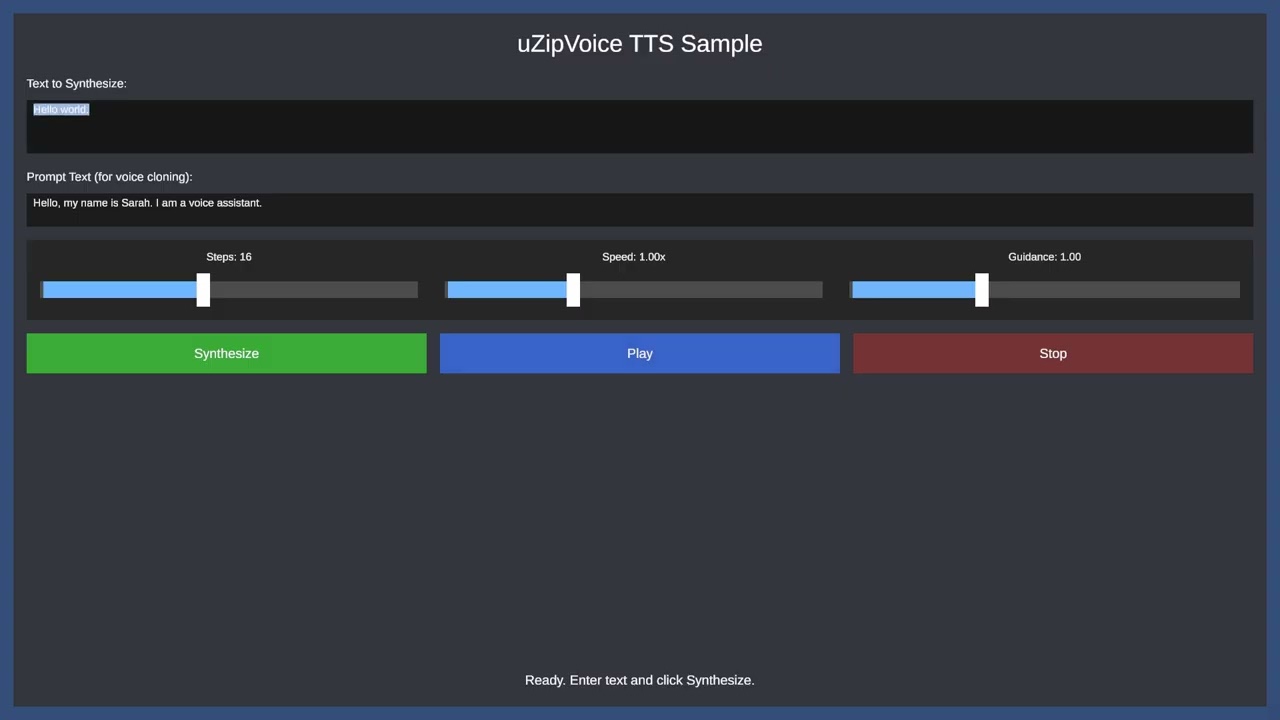
- Zero-shot TTS: Generate speech in any voice using just a few seconds of reference audio
- Fast Generation: Flow Matching enables high-quality synthesis in 4-16 steps
- Unity Native: Built for Unity 6 with AI Inference Engine (Sentis)
- Cross-platform: Supports Windows (GPU/CPU inference)
- Unity 6 (6000.0.38f1 or later)
git clone https://github.com/ayutaz/uZipVoice.gitOpen the project with Unity 6. All dependencies (espeak-ng data, packages) are included.
Download ONNX models from Hugging Face and place them in Assets/uZipVoice/Models/:
| File | Description |
|---|---|
text_encoder.onnx |
Text to condition vector |
fm_decoder.onnx |
Flow Matching decoder |
vocos_opset15.onnx |
Vocoder (mel to STFT) |
- Open the sample scene:
Assets/uZipVoice/Samples/TTSSample.unity - ONNX models and tokens.txt are pre-configured in the ZipVoiceManager component
- Zero-shot Voice Cloning: Set your reference audio in the Inspector
- Select the TTSSampleController in the Hierarchy
- Assign your reference AudioClip to the
Prompt Audiofield in the Inspector - Provide the corresponding text for the reference audio in the
Prompt Textfield
- Enter Play mode and test TTS
using Cysharp.Threading.Tasks;
using uZipVoice.Core;
using UnityEngine;

public class TTSExample : MonoBehaviour
{
    public ZipVoiceManager zipVoice;
    public AudioSource audioSource;
    public AudioClip promptAudio; // Reference voice (optional)

    void Start()
    {
        InitializeAndSynthesize().Forget();
    }

    async UniTask InitializeAndSynthesize()
    {
        await zipVoice.InitializeAsync();

        var options = new SynthesisOptions
        {
            NumSteps = 16,
            Speed = 1.0f,
            GuidanceScale = 1.0f
        };

        // promptAudio can be null for default voice estimation
        AudioClip clip = await zipVoice.SynthesizeAsync(
            "Hello, this is a test.",
            promptAudio,
            "Reference text for the prompt audio.",
            options
        );

        audioSource.clip = clip;
        audioSource.Play();
    }
}Text Input
│
▼ Tokenizer (espeak-ng G2P)
Token IDs
│
▼ TextEncoder (ONNX)
Condition Vector
│
▼ FMDecoder (ONNX) × N steps (Euler ODE)
Mel Features (100 dim)
│
▼ Vocos (ONNX)
STFT Coefficients
│
▼ ISTFT (NWaves library)
Waveform (24kHz)
| Component | Description |
|---|---|
ZipVoiceManager |
Main API for TTS synthesis |
ZipVoiceConfig |
ScriptableObject for configuration |
EspeakTokenizer |
Text to phoneme conversion using espeak-ng |
TokenMap |
Phoneme to token ID mapping |
TextEncoder |
ONNX inference for text encoding |
FMDecoder |
Flow Matching decoder with Euler solver |
Vocos |
Vocoder for mel to STFT conversion |
ISTFTProcessor |
Inverse STFT using NWaves library |
FeatureExtractor |
Mel spectrogram extraction from audio |
FMDecoder includes several optimizations for faster synthesis:
| Optimization | Description |
|---|---|
| Buffer Reuse | Reuses _xBuffer across Euler steps to reduce memory allocation |
| Reduced Yield | UniTask.Yield() called every 4 steps instead of every step |
| TensorShape Cache | Caches TensorShape for reuse in Euler integration loop |
- NumSteps: Lower values (4-8) are faster but may reduce quality. Higher values (16-32) provide better quality.
- Backend: Use
GPUComputefor best performance on supported hardware. - Batch Size: Process single utterances for lowest latency.
| Parameter | Default | Description |
|---|---|---|
| SampleRate | 24000 | Audio sample rate |
| NFft | 1024 | FFT size |
| HopLength | 256 | Hop length for STFT |
| NMels | 100 | Number of mel bands |
| NumSteps | 16 | Euler solver steps (4-32) |
| TShift | 0.5 | Time shift parameter |
| GuidanceScale | 1.0 | CFG scale (0-3) |
| Speed | 1.0 | Speech speed (0.5-2.0) |
| Voice | en-us | espeak-ng voice |
Assets/uZipVoice/
├── Runtime/
│   ├── Audio/
│   │   ├── FeatureExtractor.cs
│   │   └── ISTFTProcessor.cs
│   ├── Core/
│   │   ├── ZipVoiceConfig.cs
│   │   └── ZipVoiceManager.cs
│   ├── Inference/
│   │   ├── EulerSolver.cs
│   │   ├── FMDecoder.cs
│   │   ├── TextEncoder.cs
│   │   └── Vocos.cs
│   └── Tokenizer/
│       ├── EspeakNative.cs
│       ├── EspeakTokenizer.cs
│       ├── ITokenizer.cs
│       └── TokenMap.cs
├── Samples/
│   ├── TTSSample.unity
│   └── TTSSampleController.cs
├── Tests/
│   ├── Editor/
│   │   ├── EulerSolverTests.cs
│   │   ├── TokenMapTests.cs
│   │   └── EspeakTokenizerTests.cs
│   └── Runtime/
├── Models/
│   ├── text_encoder.onnx
│   ├── fm_decoder.onnx
│   └── vocos_opset15.onnx
├── Plugins/
│   ├── NWaves.dll
│   └── Windows/x64/
│       └── libespeak-ng.dll
└── Resources/
    └── tokens.txt
The project includes 97 unit tests:
| Test Class | Tests | Description |
|---|---|---|
| TokenMapTests | 24 | Token mapping validation |
| EulerSolverTests | 32 | ODE solver validation |
| EspeakTokenizerTests | 19 | G2P conversion tests |
| TensorShapeTests | 22 | ONNX tensor shape validation |
Run tests via Unity Test Runner (Window > General > Test Runner).
MIT License
Note: This project includes espeak-ng (GPLv3) for text-to-phoneme conversion. Please review THIRD_PARTY_LICENSES.md for third-party license details.
- ZipVoice - Original Python implementation
- espeak-ng - Text-to-phoneme conversion
- Vocos - Neural vocoder
- NWaves - Digital signal processing library for ISTFT
- ZipVoice - Original implementation
- piper-unity - Reference for espeak-ng integration

